SecurityXploded.com
Autorun File Remover - Free Autorun Virus File Removal Tool | www.SecurityXploded.com
Autorun File Remover

Version: 6.0

See Also
Contents
 
About
Autorun File Remover is the free tool to scan and remove Autorun Virus file (autorun.inf) from your Windows system.

Autorun is the built-in feature of Windows that allows applications to run automatically from USB/CD drives as soon as they are inserted. This feature is often exploited by Viruses to spread from one system to another. Due to these security concerns it is always advised to Disable Autorun on your system.

Even these Autorun files (autorun.inf) often are not removed by most of the Anti-virus softwares. In such cases, Autorun File Remover helps you to quickly scan and remove any dangerous Autorun files.

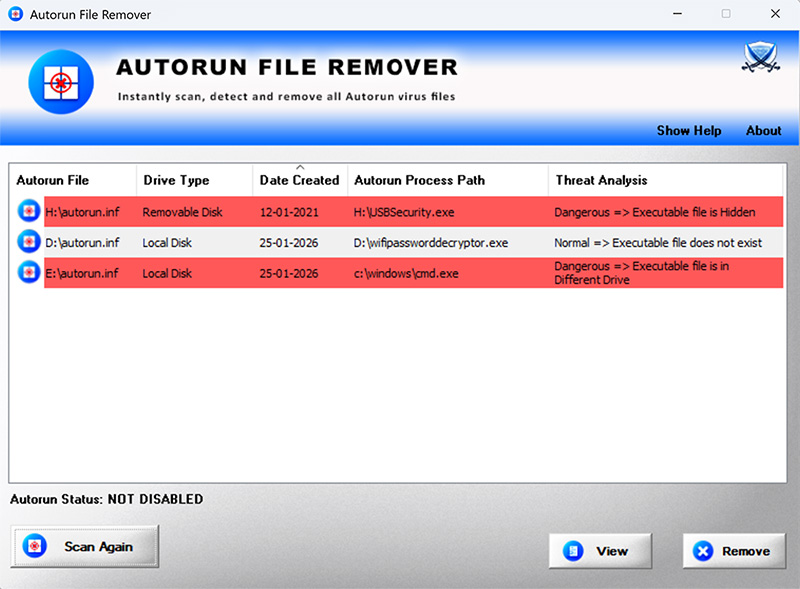
It automatically parses every Autorun file and finds the Executable file path. Then it performs detailed Threat Analysis to find out if it is possibly a virus/malware.

It is very easy to use tool with its cool GUI interface. Also the color based threat indicator helps in quick identification of good and bad Autorun files.

Autorun File Remover is fully portable and works on all Windows systems starting from Vista to Windows 11

 
Features & Benefits
  • Free Tool to quickly scan & remove Autorun Virus files
  • Performs Advanced Threat Analysis
  • Color based representation of Suspicious files
  • Remove Malicious Autorun file with just a click
  • Open Autorun file in Notepad for inspection
  • Easy to use tool with cool GUI interface
  • Right click menu options to perform online threat analysis using VirusTotal and Google search
  • Fully portable and can be run from anywhere
  • Works on both 32-bit & 64-bit systems from Vista to Windows 11
 
How to Use?
Autorun File Remover is easy to use with its simple GUI interface. 

Here are the brief usage details

  • Launch 'Autorun File Remover' on your system
  • It will scan and list all the Autorun Files along with Threat analysis details.
  • Next you can click on 'View' button to open it in notepad for further inspection.
  • Also you can right click and view, delete or perform online threat anlaysis
  • Finally you can remove any malicious Autorun file by just clicking on 'Remove' button.
  • Anytime you can click on 'Scan Again' button to perform fresh scan.

 
Screenshots
 
Release History
Version 6.0 :  25th Jan 2026
New 2026 release supporting Windows 11. Improved autorun file analysis and messages. Enhanced GUI interface with new banner & icons. Menu options to view, delete and perform online anlaysis using virustotal.com & Google search.
 
Version 5.0 :  5th Dec 2016
Major 2016 edition with new features to display current Autorun status, open file in notepad on double click and new Installer.
 
Version 4.0 :  8th Nov 2015
Mega release with support for new Windows 10 version. Also fixed the sizing problem with higher resolution computers.
 
Version 3.1 :  29th Jul 2015
New feature added to Installer to dynamically download latest version
 
Version 3.0 :  18th Mar 2015
Integrated Uninstaller into Windows Add/Remove Programs, now you can uninstall it in a standard way.
 
Version 2.5 :  17th Nov 2014
Removed false positive with various Antivirus solutions
 
Version 2.0 :  23rd Jan 2014
Improved GUI interface with magnifying icon effects.
 
Version 1.5 :  20th Aug 2013
Fixed the major bug in threat analysis of Autorun file from USB/External disk.
 
Version 1.0 :  12th Jun 2013
First public release of AutorunFileRemover
 
 
Download
FREE Download Autorun File Remover v6.0

License  : Freeware
Platform : Windows 11,10,8,7,Vista (32-bit/64-bit)

Download
 
See Also